Back to featured work

CampGlint

Founder-led product case

Designing a native iOS app for campsite signals, booking handoff, and trip readiness

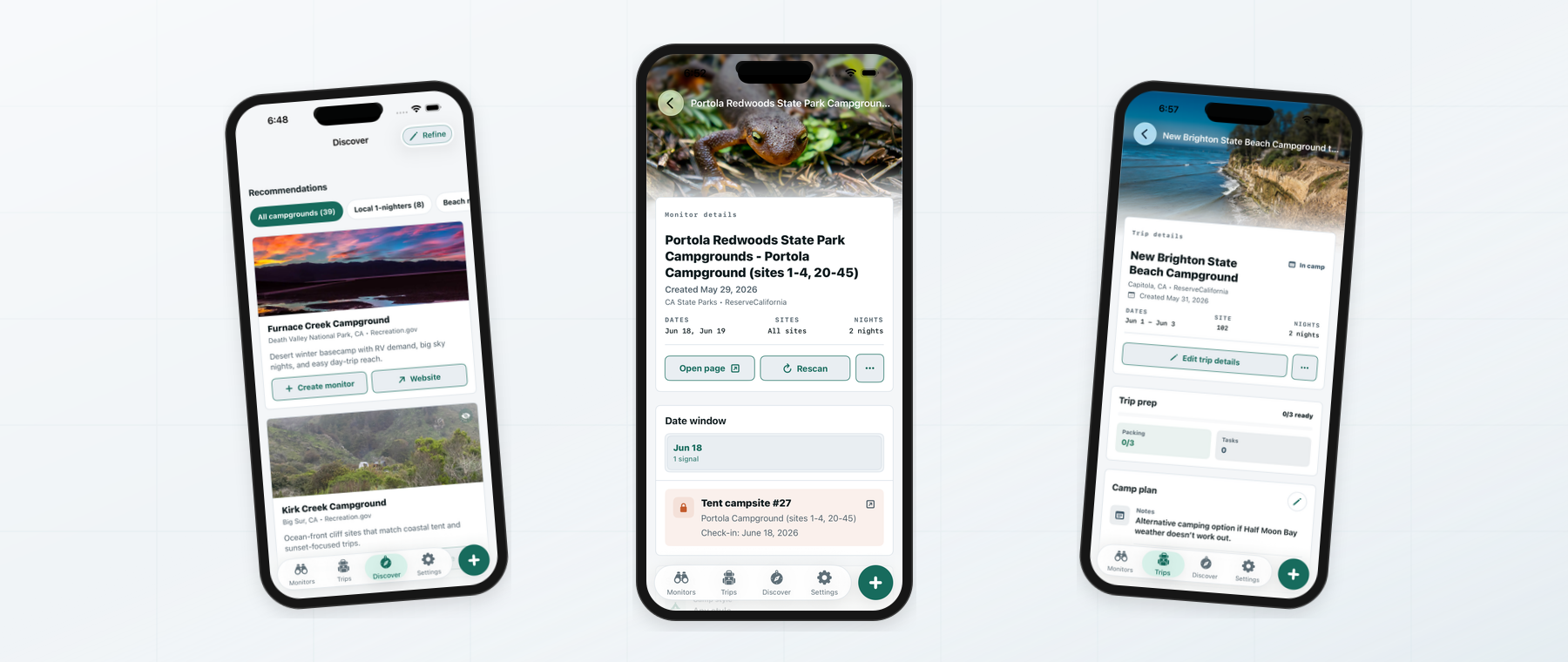
CampGlint is a native SwiftUI app that helps campers stop manually checking campground availability. The iOS experience centers on saved monitors, fast monitor creation, discovery for backup options, and trip readiness after a booking is secured.

CampGlint iOS monitors list screen
Product
CampGlint
Platform
Native iOS app
Role
Founder, product designer, iOS builder
Status
Native build, launch readiness active

Problem frame

How can campground availability shift from stressful manual checking into a calmer trip-planning flow?

My role

Founder, product designer, iOS builder

Native iOS app / Native build, launch readiness active

What mattered

Native product loop

Structured the app around a bottom-tab loop for Monitors, Trips, Discover, and Settings, with monitor creation always close to the primary job.

Monitor clarity

Designed saved-monitor cards around campground, provider, dates, nights, site scope, alert state, and direct access to the official booking source.

Fast setup

Reduced monitor creation to a focused iOS sheet with starting points, campground search, trip window, flexible-date controls, and disabled-state guardrails.

Scope

  • Auth-gated SwiftUI shell with session restore, signed-in state, and a native bottom-tab navigation model.
  • Monitors flow with saved watch cards, provider labels, scan timing, alert state, booking handoff, and a rescan action.
  • Create Monitor sheet with starting points, campground selection, trip window, stay length, flexible-date controls, and disabled-state validation.
  • Discover flow with active discovery profile, campground recommendations, provider context, availability cues, and watch actions.
  • Trips flow with confirmed-trip details, readiness progress, packing and task counts, site details, and empty/past-trip states.

How it unfolded

From ambiguity to product direction

  1. 01

    Define the iOS job

    Problem framing

    The core job is simple: watch campground availability, surface trustworthy signals, and help campers act before a site disappears.

  2. 02

    Make Monitors the home base

    Monitors tab

    The app opens on saved watches because that is where users need status, confidence, and next actions after setup.

  3. 03

    Keep creation lightweight

    Create Monitor sheet

    Monitor creation separates campground choice, trip window, and flexibility so users can start watching even when plans are not final.

  4. 04

    Add discovery before commitment

    Discover tab

    Discover gives users backup campgrounds worth watching instead of forcing them to know every destination before using the product.

  5. 05

    Close the loop after booking

    Trips tab

    Trips turns a successful reservation into a lightweight readiness space for packing, tasks, dates, and site details.

Product story

Selected product moments

01

Monitors

The iOS home screen starts with the user's active watches

The signed-in home screen puts saved monitors first, giving campers a quick read on campground targets, scan timing, alert state, and next actions.

Saved monitor cards, active status, provider names, last scan timing, rescan action, and bottom-tab navigation.

CampGlint iOS monitors list screen
02

Monitor detail

Monitor detail turns a saved watch into a clear action surface

The detail screen keeps campground context, trip timing, scan status, and booking handoff close to the saved monitor.

Campground detail, reservation window, monitor status, provider context, availability signals, and booking handoff.

CampGlint iOS monitor detail screen
03

Discover

Discovery gives users backup options worth watching

Discover supports the moment before a user has a fixed destination by recommending alternate campgrounds that can become monitors.

Starting points, discovery profile, recommendation card, campground image, provider context, and watch-oriented next step.

CampGlint iOS discover recommendations screen
04

Trips

After a booking, the app shifts into readiness

Trips keeps confirmed reservation details and preparation tasks close to the same product loop that helped the user find availability.

Confirmed Upper Pines trip, date and site detail, readiness section, packing/tasks, and past-trip empty state.

CampGlint iOS trip detail screen

Decisions

The tradeoffs that made the work stronger

  1. 01

    Keep CampGlint native-first

    The product direction centers on the native iOS experience: mobile information architecture, SwiftUI interaction patterns, and platform-specific launch readiness.

  2. 02

    Use monitors as the mental model

    A monitor is easier to understand than a generic alert because it describes an ongoing watch, its target, and the user's next action.

  3. 03

    Keep booking handoff transparent

    CampGlint can surface availability signals, but official booking systems remain the final endpoint for reservations and payment.

  4. 04

    Let Trips stay lightweight

    Trip readiness supports the camping workflow without turning the app into a full planning suite or distracting from the monitor loop.

Outcome

Native iOS product evidence

  • The SwiftUI app demonstrates the core native experience across monitors, discovery, trip readiness, and settings.
  • Monitors, Create Monitor, Discover, and Trips now read as one connected iOS product loop.
  • The native foundation includes auth, session restore, bottom navigation, monitor and trip workflows, discovery, settings, notification scaffolding, deep links, App Intents, and shared visual assets.
  • Availability remains framed as an actionable signal, with official campground booking systems preserved as the final reservation endpoint.
  • Launch readiness is framed around production services, APNs validation, privacy and permissions, release configuration, App Store metadata, device QA, and accessibility QA.

Takeaway

CampGlint demonstrates native iOS product design judgment across problem framing, mobile information architecture, SwiftUI interaction systems, visual design, platform integrations, and launch readiness.